
💡 Good to know: This is done per host (property owner), not per property. If a host has multiple properties, you only need to add their tax details once.
What Is This For?
If a property owner (host) is VAT-registered, their Tax Registration Number (TRN) must be added to their profile in Atlas PMS. This ensures their TRN appears correctly on the Accommodation Invoice issued to guests.
You can also use this section to apply VAT on the management fee charged to the host — useful if your company charges VAT on its management services.
How to Add Tax Details for a Host
1. Go to Clients in the left-hand menu
2. Click Hosts
3. Find the host you want to update and click the edit (✏️) icon on the right
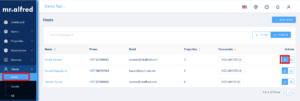
4. Scroll down to the Tax Information section
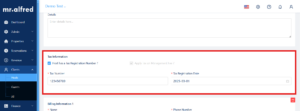
5. Tick the box “Host has a Tax Registration Number?”
6. Enter the host’s Tax Number (TRN) and Tax Registration Date
7. Optional: if your company charges VAT on the management fee, also tick “Apply Tax on Management Fee?”
8. Scroll down and click Save
The Two Checkboxes Explained
Host has a Tax Registration Number?
Tick this if the property owner is VAT-registered. Once ticked, you’ll see the Tax Number and Tax Registration Date fields appear. This TRN will show on the Accommodation Invoice.
Apply Tax on Management Fee?
Tick this if you want to charge VAT on your management fee to this host. This is separate from the host’s own VAT status — it applies to what your company bills the host for managing the property.
⚠️ The “Apply Tax on Management Fee?” option is only available if “Host has a Tax Registration Number?” is ticked first.
Still Have Questions?
Reach out to your mr.alfred account manager or email us at support@mralfred.com — we’re happy to walk you through it!