
💡 Good to know: VAT registration is set at the business level — it applies across all your properties. You only need to do this once.
What Is This Setting For?
If your business is VAT-registered, you need to enable the Tax Registration toggle in your Business Settings. This tells Atlas PMS to apply VAT on applicable fees and include tax details on all invoices issued to guests.
Without this, no VAT will be calculated or shown on your invoices — even if you’ve set up fee amounts that include tax.
How to Enable VAT Registration
1. Go to Admin in the left-hand menu
2. Click Settings
3. Scroll down until you reach the Tax Information section
4. Toggle the Tax Registration switch from No to Yes
5. Enter your Tax Number (TRN) and Tax Registration Date
6. Scroll down and click Save
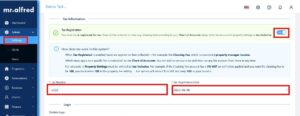
What Happens After You Enable It?
Once Tax Registration is turned on:
● Taxes are applied on fees collected by the property manager — for example, the Cleaning Fee.
● Which taxes apply to each fee is controlled by your Chart of Accounts. You can add or remove a tax definition on any fee account from there.
● Fee amounts in Property Settings must be entered as tax-inclusive. For example, if the Cleaning Fee has 5% VAT and you want the fee to be AED 100, you enter AED 105 — the system deducts AED 5 as VAT and keeps AED 100 as income.
⚠️ Always enter fee amounts as tax-inclusive in Property Settings. The system does not add tax on top — it deducts it from the amount you enter.
Still Have Questions?
Reach out to your mr.alfred account manager or email us at support@mralfred.com — we’re happy to walk you through it!